Step 1: Download pthread library package Download
Step 2: Install pthread devpak
Way 1: Double click the pthread devpak.
Way 2: * Open DevC++
* Goto Tools in the menu bar and then select Package Manager
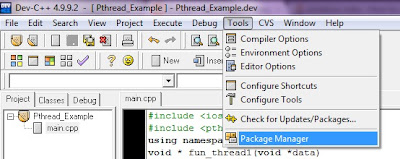
* Goto Install tab in the menu bar of DevC++ Package Manager and select downloaded pthread devpak

* After that Install package
Step 3: Create new Project in Dev C++ and write your code.
Step 4: After goto Project menu => Project Option => Select Parameter Tab
Step 5: Select Add Library or Object option.
Step 6: Select libpthreaGC2.a file from installtion directory of Dev C++. It will be in lib directory.
Step 7: Press OK.
Step 8: Final step compile and run your program.
Code: -
#include <iostream>
#include <pthread.h>
using namespace std;
void * fun_thread1(void *data)
{
for(int i=0;i<100;i++)
{
cout<<endl<<"In Thread 1"<<endl;
}
}
void * fun_thread2(void *data)
{
for(int i=0;i<100;i++)
{
cout<<endl<<"In Thread 2"<<endl;
}
}
int main(int argc, char *argv[])
{
int status;
// creating thread objects
pthread_t thrd_1;
pthread_t thrd_2;
// create thread
pthread_create(&thrd_1,NULL,fun_thread1,(void *)0);
pthread_create(&thrd_2,NULL,fun_thread2,(void *)0);
pthread_join(thrd_1, (void **)&status);
pthread_join(thrd_2, (void **)&status);
system("PAUSE");
return EXIT_SUCCESS;
}

Step 2: Install pthread devpak
Way 1: Double click the pthread devpak.
Way 2: * Open DevC++
* Goto Tools in the menu bar and then select Package Manager


Step 3: Create new Project in Dev C++ and write your code.
Step 4: After goto Project menu => Project Option => Select Parameter Tab
Step 5: Select Add Library or Object option.
Step 6: Select libpthreaGC2.a file from installtion directory of Dev C++. It will be in lib directory.
Step 7: Press OK.
Step 8: Final step compile and run your program.
Code: -
#include <iostream>
#include <pthread.h>
using namespace std;
void * fun_thread1(void *data)
{
for(int i=0;i<100;i++)
{
cout<<endl<<"In Thread 1"<<endl;
}
}
void * fun_thread2(void *data)
{
for(int i=0;i<100;i++)
{
cout<<endl<<"In Thread 2"<<endl;
}
}
int main(int argc, char *argv[])
{
int status;
// creating thread objects
pthread_t thrd_1;
pthread_t thrd_2;
// create thread
pthread_create(&thrd_1,NULL,fun_thread1,(void *)0);
pthread_create(&thrd_2,NULL,fun_thread2,(void *)0);
pthread_join(thrd_1, (void **)&status);
pthread_join(thrd_2, (void **)&status);
system("PAUSE");
return EXIT_SUCCESS;
}

I am getting pthreadGC2.dll is missing error. Any help?
ReplyDeleteDownload this dll fixer
Deletehttp://www.dll-files.com/dllindex/dll-files.shtml?pthreadgc2